
Business VoIP systems in Australia
Planning a new system or switching provider?

If you are working out whether a VoIP system suits your business, this page covers what it actually does, what happens when the power goes out, whether your calls are private, and how you keep the numbers you already advertise.
We install and support these systems for Australian businesses, and we answer our own phone. Nothing on this page is gated.
What a business VoIP system is
VoIP stands for voice over internet protocol. It means your calls travel over your internet connection rather than over a dedicated phone line.
That sounds like a technical detail and it is not. It changes three things about how a phone system behaves:
- The system stops being a box in a cupboard. The intelligence that answers, routes and transfers calls runs on a server rather than on hardware in your building. It can sit in a data centre, or on a machine in your office if you prefer.
- A handset is just a device on the network. Plug one in at a second site, or at somebody's home, and it behaves exactly as it does at the front desk. Same extension, same transfer, same directory.
- Adding a line stops being a phone company job. Capacity is a setting rather than a physical cable, so ten handsets becomes fifteen without anyone visiting.
For most businesses the practical result is one phone system across every location and every mobile, instead of a separate system per site.
- Step 1Your handsetA desk phone, a cordless handset or the app on a laptop.
- Step 2Your internetThe call becomes data and leaves on the same connection as everything else.
- Step 3The hosted PBXThe exchange that used to sit in a cupboard. It lives in a data centre.
- Step 4The phone networkWhere the call rejoins ordinary numbers, mobile and landline alike.
- Step 5The person you calledThey answer a normal phone. Nothing at their end has to change.
What it does that an older system does not
These are the features that come up in nearly every conversation, and they are all standard rather than extras.
- An auto attendant. The recorded menu that answers and offers options: press one for service, two for accounts. It sends the call to the right person without anyone picking up first.
- Voicemail to email. A message arrives in your inbox as an audio file, so it can be forwarded, kept, or listened to away from the desk.
- Calls that follow you. The system can ring a desk phone and a mobile at the same time, or ring the mobile only outside business hours. The caller dials one number and does not need to know where anyone is.
- A shared directory. A number is added once and every handset can see it.
- Transfers that actually work, including transferring a caller straight into somebody's voicemail without ringing their desk, which is what you want when you know they are not there.
- Time conditions. Different behaviour during business hours, after hours, on weekends and on public holidays, set once rather than switched over by hand.
- Call recording, where you need it. There are rules about this in Australia and they are worth reading before you turn it on.
Does VoIP work in a power cut?
This is the most common objection to VoIP and it deserves a straight answer rather than a reassuring one.
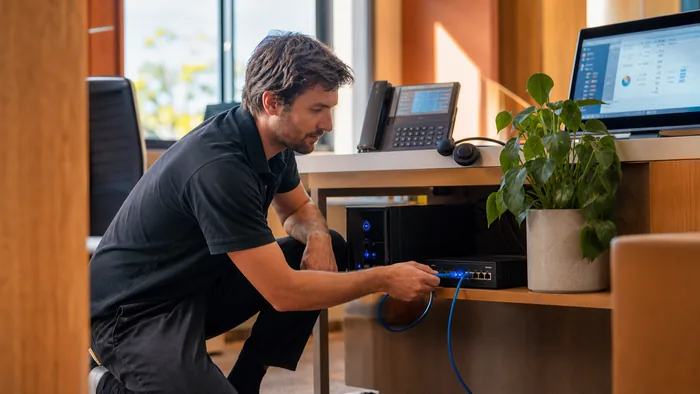
A handset on your desk needs power. Most desk phones draw power over the network cable from a switch in the comms cupboard. If that switch loses power, the phone goes dark. Your internet connection needs power too, so the modem and router stop as well.
The part people expect to be bad news is actually the good news. Because the phone system itself is not in your building, a power cut at your office does not take the system down. It only takes down the handsets. The system keeps answering, and it can be told to send every call straight to a mobile the moment the handsets stop responding. Callers hear a person, not a dead line.
An old phone system in a cupboard cannot do that. When the power goes, the whole thing goes, and the calls go nowhere.
Where the "landlines kept working" belief comes from, because it is not wrong, it is just about a service that is going away. An analogue line on copper drew its power from the telephone exchange rather than from your building, so a single corded handset kept working in a blackout. For most Australian businesses that copper service has already been switched off as part of the NBN rollout, so it is not the fallback it used to be, whichever phone system you choose.
What we actually do about it:
- A small UPS on the modem, router and network switch. This is the cheap one and it is the one most businesses skip. It keeps the phones alive through the short outages that make up most of them.
- A failover rule that diverts calls to nominated mobiles automatically if the handsets stop registering. Set up once, works without anybody doing anything on the day.
- Mobile data backup on the router, where losing calls matters enough to justify it.
Worth being clear that the first one is not expensive and it solves most of the problem.
Is VoIP secure, and are calls encrypted?
Two separate questions, and the honest answers are different.
Calls are not encrypted by default. Encryption exists and it is two things rather than one: the signalling that sets up the call can run over TLS, and the audio itself can run over SRTP. Both have to be supported and switched on at both ends, on the handset and on the provider's network. It is a configuration decision, not something that either happens automatically or is unavailable.
Worth knowing for context: a traditional phone line was never encrypted either, and it was never a question anyone asked.
But interception is not what actually costs Australian businesses money. Toll fraud is. Somebody finds a phone system reachable from the internet with a weak extension password, registers to it, and dials international premium numbers all weekend. The way most businesses discover it is the bill.
That risk is real and it is manageable:
- Unique, strong passwords on every extension. Not the extension number, and not the same one on all of them.
- The administration interface should not be open to the whole internet. If it has to be reachable, it should be restricted to known addresses.
- International dialling turned off unless you use it, and limited to the countries you actually call.
- A spend alert, so an unusual bill is a phone call on Saturday morning rather than a surprise at the end of the month.
We check all of these on the systems we look after, including systems somebody else built.
What actually causes bad call quality
Call dropouts and one way audio are the most common complaints on existing VoIP installations, and the cause is nearly always the network rather than the phone system.
The things worth checking, roughly in order:
- Upload speed, not download speed. Every time somebody speaks, the system is uploading. Connections sold on their download figure can be poor for calls even when they feel fast.
- Whether the phones share the connection with everything else. A large file upload competing with a call will win unless the network is configured to give voice priority.
- The cabling. Data cabling installed properly once will not be a problem again. Cabling that was extended by somebody in a hurry will keep producing faults that look like phone faults.
- Firmware. Handsets and phone systems are software and they get updates. Most manufacturers publish them free, and a phone that has not been updated in three years is a reasonable first suspect.
- The firewall. Calls that connect but have no audio are usually firewall or routing behaviour rather than a broken phone.
If you have an existing system doing any of this, we will look at it with you. Diagnosing somebody else's installation is ordinary work.
Keeping the numbers you already advertise
You almost never have to change your number, and this is the part of a changeover that worries people most.
What can be moved to our network:
- 1300 and 1800 numbers.
- Every Australian landline number, including 02, 03, 07 and 08.
- 131 numbers.
- Indial ranges, including hosting a range of 100 numbers.
The handsets these systems run
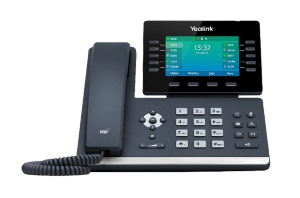
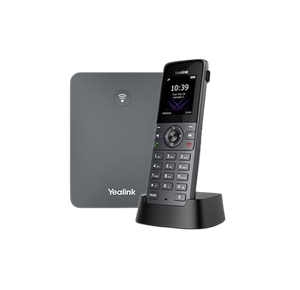
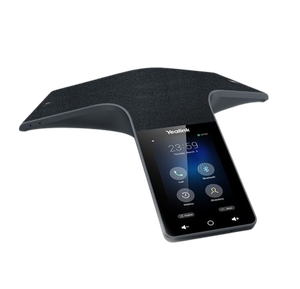
The same system drives a desk phone, a cordless handset and a conference phone. These are the three we fit most often, and every price excludes GST.
How porting actually works
The old page promised this and never delivered it, so here it is properly.
- You authorise the move. Porting is requested by the gaining provider, which is us, on your written authorisation. You do not contact your current provider to start it.
- The details have to match the losing carrier's records exactly. Account name, account number and service address, taken from a recent bill rather than from memory. Mismatched details are the single most common reason a port is rejected, and it costs days rather than minutes.
- Simple ports move quickly. A single number with nothing unusual attached is a short process. A number that is part of an indial range, sits on a business line bundle, or is tied to other services is a complex port, and complex ports are scheduled rather than immediate.
- The handsets are usually ready before the number moves. We install and test the new system while your existing numbers are still answering the old way, so nothing depends on everything happening at once.
- The cutover itself is quick, and it is scheduled for a time that suits you rather than the middle of a Tuesday morning.
The one thing not to do, and it is the mistake that loses numbers. Do not cancel your existing service before the port has completed. Cancelling releases the number back to the carrier, and once it is released it may not be recoverable. Let the port close the old service.
If you are not sure what you have, send us a recent bill and we will tell you what can move and what cannot.
AI answering and virtual receptionists
AI answering software picks up the phone, works out what the caller wants from ordinary speech, and either handles it or passes it to a person. It sits in front of the system you already have rather than replacing it, so it can answer after hours, or only when nobody has picked up.
It suits a business that is sending callers to voicemail and losing them. It suits a business whose callers are mostly existing customers with complicated problems much less well. There is a fuller account of where it works, where it does not, and what to settle before switching one on, on our AI answering services page.
What it costs
Pricing depends on how many handsets you need, whether you are keeping existing hardware, and how many numbers are moving. It is a short conversation rather than a form.
What we can say generally: calls between your own sites and handsets do not cost anything, because they never leave the system, and most businesses moving off older line rentals find that alone accounts for a lot of the difference.

Getting a straight answer
Tell us what you have now and what is annoying you about it. That is usually enough for us to say whether a change is worth it, and we will say so if it is not.
Useful to have in front of you:
- A recent phone bill, which tells us what numbers and services you actually hold.
- Roughly how many people need a handset.
- Whether you have more than one site, or people working from home.
We work Australia wide, and the same questions come up wherever the office is. If you are weighing up suppliers in a particular city, there is a page each for Melbourne, Sydney, Brisbane, Perth and Adelaide.
Call 1300 865 879, or send us the details and we will come back to you.
Common questions
- Do I have to change my phone number?
- No. Almost every Australian number can be moved, including 1300, 1800, 131 and standard landline numbers. Send us a recent bill and we will confirm yours before you commit to anything.
- Does VoIP work without power?
- The handsets need power at your end, so they stop. The system does not, because it is not in your building, and it can send calls straight to mobiles automatically while the power is out. A small battery backup on the modem, router and network switch keeps the desk phones running through most outages.
- Are VoIP calls encrypted?
- Not automatically. Encryption is available and covers two separate things, the call setup and the audio, and both have to be enabled at each end. We will tell you whether your handsets support it. Worth knowing that the traditional phone line it replaces was never encrypted at all.
- Can somebody hack a VoIP system?
- The realistic risk is not somebody listening to your calls, it is somebody using your system to make expensive international ones. Strong extension passwords, an administration interface that is not exposed to the internet, and international dialling limited to what you use will deal with nearly all of it.
- Can I keep the handsets I already own?
- Often, yes. Most business handsets can be reconfigured to a different system, and we would rather reuse hardware that works than sell you replacements. We will tell you honestly if yours are too old to be worth keeping.
- Will my internet connection cope?
- Usually, and upload speed matters more than download speed. Tell us what connection you have and how many people will be on calls at once, and we will say whether it is enough before anything is ordered.
- What happens to the phone system we already have?
- Depends what it is. Some can be connected to modern lines and kept for years. Others are past the point where parts or support exist. We will tell you which one you have, including when the answer is that yours is fine and you do not need us.
- Do you support systems you did not install?
- Yes, and it is a lot of what we do. Taking over a system somebody else built is ordinary work.