
Set up voicemail on a Yealink phone
How to set up and check voicemail on a Yealink desk phone, why the PIN does not come from the handset, and what to do when the message key does nothing.
Where the message key sits
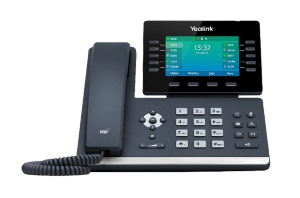
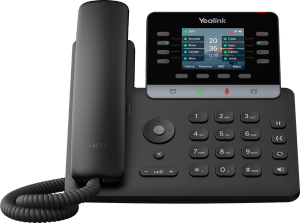
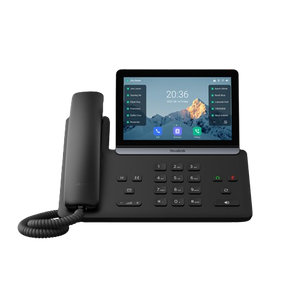
The key with the envelope on it, near the arrow keys on most of the range and on the display on the touchscreen models. It dials your voicemail rather than opening a menu in the phone.
- Get your voicemail PIN before you start. It comes from whoever runs your phone system, not from the handset and not from us. This is the step that stops most people, and it is worth a two line email to sort out first.
- Find the message key on the handset. It is the one with an envelope on it, and on most Yealink desk phones it sits near the arrow keys.
- Press it. The phone dials your voicemail, which is a service on your phone system rather than anything stored in the handset.
- Enter the PIN when you are asked for it.
- Listen to the menu rather than pressing numbers off a web page. What each number does is decided by your phone system, so the menu you hear is the only reliable instruction. It will offer to record a greeting somewhere near the top.
- Record the greeting when it offers. Say the business name, then what you want the caller to leave, and stop. Long greetings get hung up on.
- Listen back to it before you accept it. The menu will offer this, and a greeting recorded over a noisy office usually needs a second go.
- Test the whole thing properly. Ring the number from a mobile, leave yourself a message, and check that the light on the handset comes on and that you can play it back.
Your voicemail is not in the phone
This is the thing worth knowing before anything else, because it explains why the instructions you find elsewhere do not match what you are seeing.
The messages, the greeting, the PIN and the menu all live on your phone system, not in the Yealink on your desk. The handset has a key that dials the service and a light that tells you a message is waiting. That is genuinely all it does. If you have been hunting through the phone's settings for a voicemail menu, you have been looking in the right place for the wrong thing, and it is not there.
It also explains something confusing about the search results for this. Every provider publishes its own instructions, with its own numbers, under a heading about Yealink phones. They are not contradicting each other. Each one is describing its own system, and only one of them is yours.
The PIN, which is where most people are actually stuck
There is no Yealink voicemail PIN. There is a PIN on your phone system, and only whoever runs that system can tell you what it is or reset it.
That is usually your provider, or whoever set the phones up. If nobody in the business knows who that is, that is worth finding out for reasons well beyond voicemail, and it is one of the more common things we get called about.
You will find pages naming a default PIN. Do not assume it is yours. If it happens to work, change it, because a default that a stranger can read on the internet is protecting your messages.
What the key and the light are telling you
- The envelope key dials your voicemail. It does not open a menu in the phone.
- A light or a symbol on the display means the system is holding a message for you. It goes out once the system decides you have dealt with it, which is not always the moment you finish listening.
- A light that will not go out usually means a message is saved rather than deleted, or that the phone and the system disagree about what has been heard. Restarting the handset clears the second one.
If the message key does nothing
In the order these are actually the answer.
- The extension has no voicemail switched on. It is a setting on the system, not on the phone, and a new extension often arrives without it.
- The key has no number behind it. The key needs to know what to dial, and on a phone that was set up by hand rather than centrally that field is easy to leave empty. Whoever set the phone up can fill it in.
- You have the wrong PIN, and after a few tries some systems stop letting you try.
- The phone is not registered at all, in which case nothing else works either and that is a different problem. Our Yealink support page covers what to check.
What to record
Short, and shorter than feels right. The business name, then what you want the caller to leave, then stop. A caller who has already waited through ringing will not sit through half a minute of opening hours.
Say a name and a number are what you want, because people leave neither unless asked. And if you promise to ring back the same day, keep it, because a greeting that promises something the business does not do is worse than no greeting.
Getting the messages into your email instead
Most current phone systems can email you the message as an attachment, so nobody has to remember to check the handset. It is a setting on the system rather than on the phone, so it is a request to whoever runs yours rather than something to do at the desk.
It is worth asking for. A message sitting on a phone at an empty desk is a missed enquiry, and one in an inbox is one somebody can actually answer.
Who we are, and what we are not
We are VoIP System. We install and support Yealink phones for Australian businesses, and we set up voicemail on them regularly. We are not Yealink, and we are not one of their partners, resellers or authorised agents. That is also why this page does not hand you a PIN or a set of numbers to press: on your system they would be wrong.
If your problem is that calls are not reaching the phone in the first place, that is forwarding and do not disturb, which is a different thing. If you would rather hand this over, call 1300 865 879 or tell us what the phone is doing.
Common questions
- What is the PIN for Yealink voicemail?
- There is not one. The PIN belongs to your phone system rather than to the handset, so it came from whoever set your phones up or from your provider, and only they can tell you or reset it. Any page naming a default is naming their own system's default, which may or may not be yours. If one does happen to work, change it.
- How do I listen to my messages on a Yealink phone?
- Press the key with the envelope on it, enter your PIN, and follow the menu you hear. The menu belongs to your phone system, so listen to the options rather than following numbers from a web page, because the numbers differ between systems.
- Why is there no voicemail option in my phone's menu?
- Because voicemail is not a feature of the handset. The messages, the greeting and the PIN all live on your phone system, and the phone only has a key that dials it and a light that says something is waiting. Hunting through the phone's settings for a voicemail menu is looking in the right place for the wrong thing.
- The message key does nothing when I press it
- Usually one of two things. Either voicemail has not been switched on for that extension, which is a setting on your phone system and is often missed on a new extension, or the key does not know what to dial, which happens on phones set up by hand. Both are quick for whoever manages the system, and neither is a fault with the handset.
- The light will not go off
- Most often the message is saved rather than deleted, so the system still counts it as waiting. If you are sure everything has been dealt with, the handset and the system have probably lost track of each other, and restarting the handset settles that.
- Can I get voicemail sent to my email?
- On most current phone systems, yes, as an attachment you can play on a phone or a computer. It is a setting on the system rather than on the handset, so it is a request to whoever runs yours. It is worth asking for, because a message sitting on a phone at an empty desk is a missed enquiry.