
Yealink phone provisioning and PBX configuration
For whoever is setting up more than a handful of Yealink handsets. How to decide whether to provision centrally, the three ways a phone finds its settings, and the enrolment trap that catches second hand stock.
The handsets this usually means
The models that arrive by the boxful. Provisioning works the same way across the range, and the differences are in the configuration rather than the method.
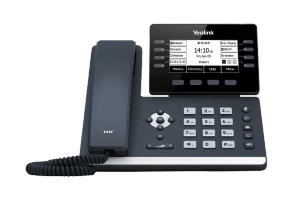
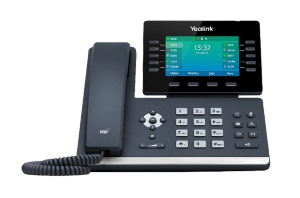
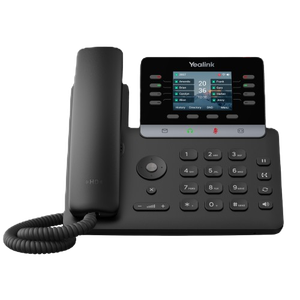
- Count the handsets and decide whether to provision at all. Under about five, configuring them by hand is quicker and there is nothing to maintain afterwards. Above that, the argument changes, and the section below explains why it is not really about the first day.
- Find out where the handsets are already pointed, before you touch anything. New stock from one supplier is predictable. Second hand handsets, or stock that has moved between suppliers, are not, and this is the step that saves an afternoon.
- Decide how the phones will find their settings. There are three mechanisms and one of them is almost always the right answer in a small office. They are compared below.
- Work out what your phone system already does. Most current systems will provision Yealink handsets themselves and hand you a template, which means the job is filling in a form rather than building a server.
- Write one configuration for the whole office, then one small file per handset for the things that differ. Keeping those two apart is what makes the next change a five minute job instead of a morning.
- Point the phones at it, using whichever of the three mechanisms you chose.
- Reset one handset and watch it come up, not twelve. If it collects its settings, registers and can make a call, then you have a working process. If it does not, you have one phone to fix rather than a roomful.
- Do the rest, then put the configuration somewhere it will be found again. Whoever picks this up in two years will thank you, and it might be you.
Decide whether to provision at all
For a handful of handsets, setting each one up through its own web interface is quicker than building anything, and there is nothing left behind to maintain. Somewhere around five phones that stops being true.
The threshold is not really about the first day, though, and that is what people get wrong. It is about the second time you touch them. Changing a setting on fourteen handsets by hand is fourteen chances to do it differently, and a year later you have fourteen phones nobody can describe. Provisioned properly, that change is one file and a reboot.
Find out where the handsets are already pointed, first
This is the step that is missed, and it is the most expensive one to miss. A Yealink handset can already be enrolled in an automatic service that tells it where to fetch its settings from, and that enrolment belongs to whoever sold it rather than to whoever owns it now.
So a handset can come out of a box, ignore everything you have set up, and quietly fetch somebody else’s configuration instead. It is not broken and there is nothing wrong with your server. It is doing exactly what it was told to do by a business you have never dealt with.
This is not a rumour. Another Australian provider documents the same behaviour on its own support pages, including that handsets can be moved from one supplier’s service to another without notice, so with second hand stock or handsets that have changed hands, assume it until you have proved otherwise. The fix is not technical either: whoever supplied them has to release them, so what you want before you start is the serial numbers and a name to ring.
The three ways a phone finds its settings
Every method comes down to telling the handset one address. They differ in who does the telling.
- The phone asks the network when it starts. Convenient when it works, and it depends entirely on how the network is set up, so it is the one to test rather than assume.
- The network hands the address out with the IP address. Reliable and invisible once configured, and it needs somebody with access to the network equipment. In an office with a managed network this is usually the right answer.
- Somebody types the address into the handset once. Unglamorous, works everywhere, and perfectly reasonable for a dozen phones. It is a minute per handset and then they look after themselves for good.
Above all three sits the manufacturer’s own redirection service, which is what makes a handset find the right address with nobody touching it at all. That is the next section, because it is not available to everybody and the page would be misleading if it pretended otherwise.
What Yealink RPS actually is
RPS is Yealink’s redirection and provisioning service. A handset checks in with Yealink when it first starts, is told which address its settings live at, and goes there. That is the whole idea, and it is why a phone can arrive at a site and configure itself with nobody logging into anything.
Accounts on it are granted by Yealink to the businesses that sell the handsets. We do not have one, and this page is not going to pretend otherwise. If your handsets came from somebody who does, they can point them at whatever address you tell them, which is often the quickest path if you ask.
The reason it matters even if you never use it is the previous section. RPS is the mechanism behind a handset that ignores your setup, so knowing what it is turns a baffling fault into a phone call.
What goes in the configuration, and what stays out
Split it in two and keep it split. One file carries everything true of the whole office: time zone, dial plan, firmware behaviour, what the keys do, how the display looks. A second, small one per handset carries only what differs, which is essentially the account it registers with and the name on the screen. The temptation is to put everything in the per handset files because it is easier to reason about on day one, and it is the same mistake as configuring them by hand with extra steps. It shows up the first time somebody asks for a change across the whole office.
The parameter names themselves are the manufacturer’s and they change between firmware versions, so take them from Yealink’s own documentation for the models you actually have rather than from anybody’s blog, including this one.
Firmware, and the one rule worth having
Decide what firmware you are on and put it in the configuration deliberately, because handsets bought at different times arrive on different versions, and a fleet that has drifted is one where a fault on a single phone tells you nothing about the others. The rule is to match what your phone system expects rather than chasing the newest release. Newer is different rather than better here, and the version notes are worth ten minutes before rather than after.
When it does not fire
In the order these are actually the answer.
- The handset is enrolled somewhere else. See above. If it is coming up configured but wrong, this is almost always why
- The address is wrong, or the handset cannot reach it. Prove the address works from a computer on the same network before suspecting anything else
- The file is there but the handset will not take it. Nearly always the file name, which has to match the handset in the way the manufacturer specifies, and is nearly always a MAC address typed with the wrong separators
- It provisioned once and will not again. Many settings are applied at first boot only, so a factory reset is the honest test rather than a reboot
- One handset works and one does not. Compare the two rather than reading documentation. It is a per handset file nine times in ten
If you are setting up one phone, not a fleet
None of the above is worth it for a single handset going onto an existing system. That is a fifteen minute job through the phone’s own web interface, and it is written up in connect a Yealink T54W to a Yeastar PBX, which walks through creating the extension and registering the handset to it.
Who we are, and what we are not
We are VoIP System. We install and support Yealink handsets for Australian businesses, which is where everything above comes from. We are not Yealink, and we are not one of their partners, resellers or authorised agents, so take the parameter names from their documentation rather than ours.
If you are weighing this up for an office and would rather hand it over, call us on the number in the header or ring 1300 865 879. There is more Yealink troubleshooting on our Yealink support page.
Common questions
- What is Yealink RPS?
- The redirection and provisioning service Yealink runs. A handset checks in with Yealink the first time it starts, is told which address its configuration lives at, and fetches it from there, which is how a phone can arrive on site and set itself up with nobody logging in. Accounts on it are granted by Yealink to the businesses that sell the handsets, and we do not have one.
- Why is my Yealink phone pulling the wrong configuration?
- Almost always because it is still enrolled in an automatic service belonging to whoever sold it, which points it somewhere other than where you want it. It is not a fault and your server is probably fine. Second hand handsets and stock that has changed suppliers are the usual cases, and the fix is to have the previous supplier release them rather than anything you can do at the phone.
- How many phones before provisioning is worth the effort?
- Around five, but the number is the wrong test. The real question is whether anybody will have to change these handsets again. If the answer is yes, provision them at any size, because the saving is not in setting them up, it is in every change after that. If they will be set up once and never touched, doing it by hand is defensible.
- Do I need to build a provisioning server?
- Usually not. Most current phone systems will provision Yealink handsets themselves and give you a template to fill in, so the work is configuration rather than infrastructure. Check what your system already does before standing anything up, because a separate server is a thing somebody then has to own.
- Can I provision handsets without touching the network equipment?
- Yes. Typing the address into each handset once works everywhere and needs nothing from the network. It is a minute per handset and then they maintain themselves, which for a dozen phones is a perfectly sensible trade and avoids waiting on somebody else for access.
- Which firmware should the handsets be on?
- Whatever your phone system expects, rather than the newest available. Newer is different rather than better here. What matters more is that the fleet is consistent, because handsets bought at different times arrive on different versions, and once they have drifted apart a fault on one tells you nothing about the rest.