
Yealink phones in Australia
Need handsets for your office?
The Yealink desk phone range
Corded desk phones from the entry level up to the big touchscreen models. Every one of these is a phone we install and support.
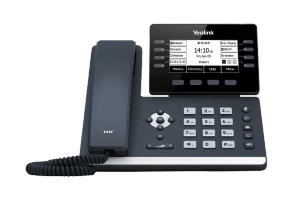
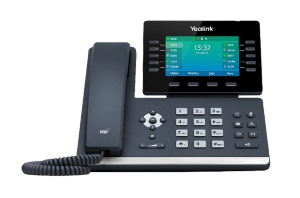
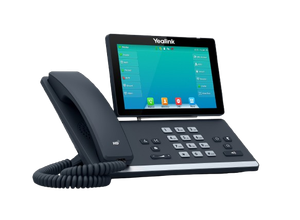
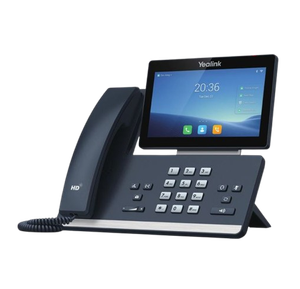
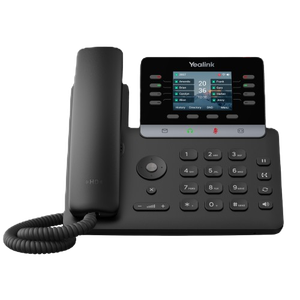
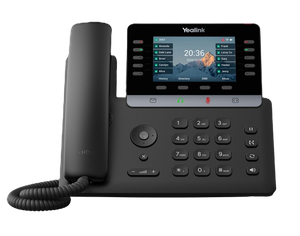
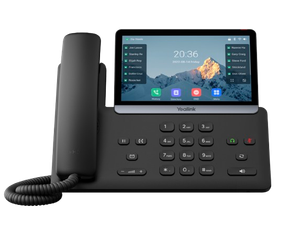
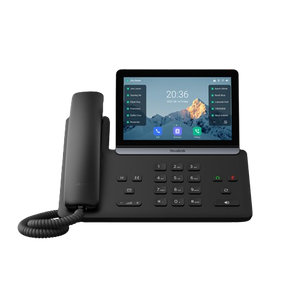
Yealink makes the desk phones and cordless handsets most Australian small businesses end up with, and they are good. The hard part is not the brand, it is working out which of about thirty models suits your desks, and getting them set up so they work on day one.
We are highly trained across the Yealink range and have been installing it for years. We are not the manufacturer, and we will tell you when a cheaper model does the job.
Choosing a desk phone
Ignore the model numbers to start with and answer three questions.
How many lines and buttons does the person actually need? Most staff need one line and a handful of speed dials. Reception needs to see who is on a call and move calls quickly, which is a different phone and sometimes an expansion module beside it.
Do they need wifi, or is there a network cable? A cable is better wherever you can get one. See the section below, because this is where most buying mistakes happen.
Do they need a screen they will actually use? A large colour touchscreen is genuinely useful for somebody managing calls all day and is money wasted on a desk that takes four calls a week.
Broadly, the range splits three ways:
- A phone for an ordinary desk. A small backlit screen, a few line keys, a good handset. This is the right answer for most people in most offices, and it is where the T73U and the T53W sit.
- A phone for somebody who lives on the phone. A larger adjustable colour screen, more line keys, built in Bluetooth and wifi, and a USB port for a headset. The T54W and T57W are the common choices.
- A phone for reception, or for a director who wants the good one. Big touchscreen, Android, more of everything. The T58W and the T88 series.
Tell us how many desks and what each person does, and we will put a list together. It is usually a shorter conversation than reading thirty spec sheets.
The W suffix, and the wifi mistake that costs people a fortnight
A "W" on the end of the model number means wifi is built in. A T54W, T53W or T57W connects to your wireless network on its own.
A model without the W cannot do wifi at all without a USB dongle. A T46S, T48S, T42S, T41S, T27G, T29G, T46U, T48U, T43U and others need a WF40 or WF50 plugged into the back. There are two, and the difference matters:
- WF40 connects to 2.4GHz networks only.
- WF50 connects to 2.4GHz and 5GHz.
If your office wifi is 5GHz only, a WF40 will never see it. The phone scans, finds nothing, and gives you no clue why.
That list is the common models rather than a complete compatibility table, because those go stale and a wrong entry sends somebody to buy the wrong part. If you tell us the model we will tell you which dongle, or whether you need one at all.
The honest advice is usually to run a cable. Wifi on a desk phone works, and it is the right answer for a heritage building or a fit out you cannot touch. It is not the right answer just because it is easier to order. If you already have a Yealink on wifi and it is misbehaving, the wifi guide covers it step by step.
Cordless handsets and DECT
Yealink's W series covers cordless: a base station that connects to your phone system, and handsets that roam. It suits a warehouse, a workshop, a surgery, a pub, anywhere the person who needs to answer is not sitting down.
The range runs from a single handset and base for a small site up to multi cell systems that hand a call between base stations as somebody walks a large building, and there are repeaters for filling in the gaps.
Handsets and bases are sold separately as well as in kits, which is the most common ordering mistake we see. A handset on its own will not work without a base station to register to.
If you are still deciding whether cordless is right at all, the cordless and DECT page covers how it works and where it beats a desk phone.
Conference phones
A room phone is worth having when a speakerphone on a desk phone stops being enough, which is usually the moment more than three people are on the call.
The choice is mostly about room size and whether you want it wired or wireless. Yealink's conference range covers a small huddle room through to a boardroom, and the wireless models remove the problem of getting a cable to the middle of a table, which is often the real reason a room has no phone in it.
Headsets
A headset is the cheapest upgrade in this whole list for anybody on the phone more than an hour a day, and the thing that decides it is not the headset, it is whether it connects properly to the phone you own.
Yealink's own headsets pair to their desk phones without an adapter. Third party headsets usually work too, sometimes with a cable or a dongle. If you already have a WH62 and a T54W, the guide to connecting them walks through it.
Power, cabling and the thing people forget
Most Yealink desk phones can be powered over the network cable, which is called PoE, so one cable does data and power and there is no plug pack under the desk. That only works if the network switch they plug into actually supplies power, and a lot of small offices have a switch that does not.
If yours does not, each phone needs a power adapter, and it needs the right one for the model and for Australian sockets. It is a small thing that stops an install dead when twenty phones arrive and there is nothing to plug them into.
Worth checking before you order, and we check it as a matter of course.
Installation and pre configuration
This is the part that is worth more than the hardware and it is what we would rather be judged on.
Phones can arrive already configured. We set them up before they are sent, so each handset knows which extension it is, which system it registers to, and what its speed dials are. They arrive labelled, they plug in, and they work. Nobody spends a morning typing settings into a dial pad.
What that covers:
- Building the extensions and the call flow on your phone system, including who rings first, what happens after hours, and where a call goes when nobody answers.
- Pre configuring each handset to the desk and person it is for.
- Checking the network first, which means the switch, the power and the cabling, before anything is ordered rather than after it arrives.
- Being there or on the phone on the day, and showing people how to transfer a call, which is the single thing everybody asks in the first week.
- Ongoing support afterwards, which is the same number, not a different company.
We also do this for phones you bought somewhere else. If a box of handsets turned up and nobody knows what to do with them, that is ordinary work.
Handset reviews
We have written up several of these in detail, including the things the spec sheet does not tell you:
How to buy, and what happens next
Prices are on each product page. What we do not do is take orders through this website. Tell us what you need and we will quote it, including installation, and the quote will say what the phones cost and what the work costs rather than rolling them together.
If you already know the model, say so and it is a short conversation. If you do not, tell us how many desks and what the business does, and we will make a recommendation you can check.
Call 1300 865 879, or send us the details.
Already own Yealink phones and just need somebody who knows them? That is Yealink support, and none of it is gated.
Common questions
- Do you sell Yealink phones online?
- Not through a checkout on this site. We quote, supply and install, which lets us check the phone suits your system and your network before you have paid for twenty of the wrong thing.
- Are you Yealink?
- No. Yealink makes the hardware. VoIP System is an independent Australian company that supplies, installs and supports it. We are not a Yealink partner, reseller or authorised agent, and we will say so plainly when something is a warranty matter for the manufacturer.
- Can you supply phones for a system somebody else manages?
- Yes. We can pre configure handsets for a system we do not run, as long as we can get the details we need from whoever does.
- Which Yealink phone should I buy?
- For most desks, an entry or mid range model with a small colour screen is plenty. Save the large touchscreens for reception and for people on the phone all day. Tell us the desks and we will be specific.
- Do I need the W model?
- Only if the phone cannot reach a network cable. A wired phone is more reliable and usually cheaper. If it does need wifi, the W models have it built in and everything else needs a WF40 or WF50 dongle.
- Will my old Yealink phones still work?
- Usually. Older models are often fine on a modern system, and reusing them is cheaper than replacing them. We will tell you honestly when a handset is too old to be worth keeping rather than selling you a new one by default.
- Do the phones come with a warranty?
- New hardware comes with the manufacturer's warranty. We will tell you what applies to what you are buying before you buy it.