
Why choose a Yealink desk phone
A short buyer’s guide to whether the badge matters, which of the usual claims hold up, and when another brand is the better answer.
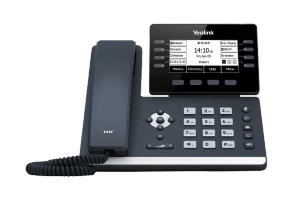
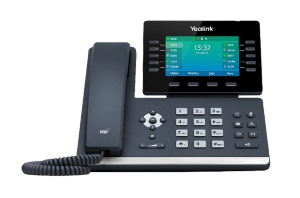
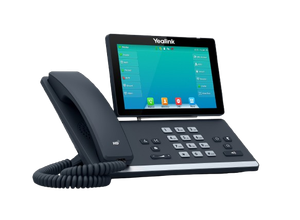
What a Yealink desk phone looks like across the range
Three from three parts of the range, to show the spread rather than to pick one. Which of them suits a particular desk is answered on the Yealink phones page.
The question underneath this one
Almost nobody sets out to buy a Yealink. They get quoted one, or they inherit a deskful of them, and they want to know whether the badge on the front is doing anything or whether a phone is just a phone.
Mostly a phone is just a phone. There is one exception that matters more than the rest of the list put together, and it is not the one the brochures lead with.
The advantage that actually matters
A Yealink desk phone is a standard SIP handset. In plain terms that means it is not tied to the phone system it is plugged into, and it is not tied to whoever sells you your calls.
That is worth money at exactly one moment, and it is the moment nobody thinks about while buying: the day you want to change provider or change systems. Handsets that are locked to one provider have to be replaced when you leave, which turns a change of supplier into a hardware purchase. Standard ones move across.
Handsets also outlast the systems behind them. A set bought today can reasonably still be on the desks after the phone system has been replaced once, so being able to keep them is not a small thing.
The claims that are true
The old version of this page listed twelve advantages. These are the ones that hold up.
- The audio is genuinely good, and the noise handling matters more than people expect in an open office or anywhere with a hard floor
- The range is wide, so the same brand covers a spare desk in the corner and a reception console without anybody mixing manufacturers
- They last. We see plenty still working after a system change or two, and replacing a working handset is rarely money well spent
- The interface is unremarkable, which is a compliment. Staff who have used any desk phone can use one without being trained
The claims that are filler
The rest of that list is the sort of thing any manufacturer says about any product, and a buyer’s guide that repeats it is not a guide.
- Cost effective and excellent value. Meaningless without a figure to compare against, and it depends entirely on the model
- Scales from small business to enterprise. That is a description of the phone system, not of the handset sitting on the desk
- Secure, with encryption. True of any current SIP handset when the system is set up for it, so it is not a reason to pick one brand
- Energy efficient. Unverifiable, and not a thing anybody has ever chosen a desk phone for
Being able to tell those two lists apart is most of what protects you from a quote built out of feature bullets.
When another brand is the better answer
There are real ones, and a page that cannot name them is advertising.
- You already run another brand and it works. A mixed estate means two provisioning methods and two sets of habits for whoever supports it, and that costs more than the handsets save
- Your phone system supplier only properly supports something else. Support by model and firmware is what decides this, not the badge
- You need one specific thing another range does and this one does not. That happens, and it is worth asking rather than assuming
We work on Grandstream equipment as well, and there is a page on it at Grandstream IP PBX.
Which model, and where that is answered
Deliberately not on this page. Choosing between the models is a different question and it is answered properly on our Yealink phones page, which covers how many line keys somebody actually needs, the wifi trap that catches people out, and where each part of the range sits.
If you want the detail on a particular handset, we have written up the T54W, the T53W and the T57W in detail, including the things a spec sheet leaves out.
What we do, and what we are not
We are VoIP System. We install and support Yealink handsets for Australian businesses, and we work on them every week.
We are not Yealink. We are not one of their partners, resellers or authorised agents. That is the reason the two lists above are separate lists rather than one long one.
If you already have Yealink phones and one of them is misbehaving, the troubleshooting is on our Yealink support page, and it is free to read.
Otherwise, call 1300 865 879 or send us the details.
Common questions
- Are Yealink phones locked to one provider?
- No. They are standard SIP handsets, which means they work with most phone systems and are not tied to whoever sells you your calls. That matters most on the day you want to change supplier, because handsets that are locked have to be replaced and standard ones move across.
- Can we mix Yealink with the handsets we already have?
- Technically yes, and most offices we see are already a mix. It is worth knowing that a mixed estate means two provisioning methods and two sets of habits for whoever supports it, so it is a trade rather than a free choice.
- Is VoIP System a Yealink partner?
- No. Yealink makes the hardware. VoIP System is an independent Australian company that installs and supports it. We are not a Yealink partner, reseller or authorised agent, which is why this page has a section about when another brand suits you better.
- How long do they last?
- Longer than the system behind them, usually. We see plenty still working after a phone system has been changed once, which is the practical argument for handsets that are not tied to one provider. Replacing a working desk phone is rarely money well spent.
- Which model should we get?
- That depends on how many lines each person needs to see at once and whether they have a network cable at the desk, and it is answered properly on our Yealink phones page rather than here. Tell us how many desks there are and what each person does and we will put a list together.