
NBN phone systems for Australian business
Planning a new system or switching provider?

The copper phone line most Australian businesses used for decades has been switched off. Your phones now run over your internet connection, which changes what you buy, what can go wrong and who you call when it does.
This page covers what that means in practice, and the question we get asked most: whether you have to throw away the phone system you already own.
What an NBN phone system actually is
There is no such thing as a phone that plugs into the NBN the way a phone used to plug into a wall socket.
What people mean by an NBN phone system is a phone system that works over an internet connection instead of a dedicated phone line. The calls travel as data over your NBN service, alongside your email and everything else. The technology is VoIP, and NBN is simply the connection it runs on.
That is why the two terms get used interchangeably and why the distinction still matters. NBN is the road. VoIP is the vehicle. Changing your internet provider does not have to mean changing your phone system, and changing your phone system does not have to mean changing your internet.
Can you keep the phone system you already have?
You can, but it is not what we recommend. We recommend replacing an old system with new desk phones or softphones, and we install both. A softphone is a phone app on your computer or mobile.
An old PABX can still work on the NBN. A gateway sits between your existing system and the network, and translates between the two. Your handsets, your extensions, your line hunt and your caller ID keep working the way they always have.
If you are weighing that against replacing it with a system that runs off site, hosted PBX covers the choice in full.
A gateway keeps your existing system as it is, including its features and its limits.
As a system nears the end of its life, spare parts get harder to find. A gateway cannot add features the old system does not have. Paying to keep a system running that frustrates everybody is a false economy.
If you still prefer to keep your current system, we can connect it with a gateway.
Why we recommend replacing it
The practical difference is that a modern system does things the old one could not, rather than doing the same things over a different wire.
Calls follow people to a mobile or a laptop. Voicemail arrives as email. Extensions work from home or another site as though they were in the building. You add a person without a technician visiting to run a cable. None of that was possible on a copper line and all of it comes as standard now.
Any current system is NBN ready out of the box. That phrase used to mean something when the rollout was happening and it does not any more, so treat it as a given rather than a feature somebody is selling you.
What your NBN connection type changes
Not all NBN connections behave the same, and the type you have affects your phones more than most people expect.
The two things that matter for calls are upload speed and consistency. A call needs very little bandwidth but it needs it steadily, in both directions. Download speed, the number in every advertisement, is close to irrelevant for voice.
Fibre to the premises is the most consistent. Connections that use part of the old copper run for the last stretch are more variable, and a long copper run can mean an upload speed that struggles once a few people are on calls at once. Fixed wireless and satellite services vary with conditions in a way fixed connections do not.
None of this rules out a phone system. It changes how many simultaneous calls the connection will carry cleanly, and that is a number worth knowing before you buy rather than after.
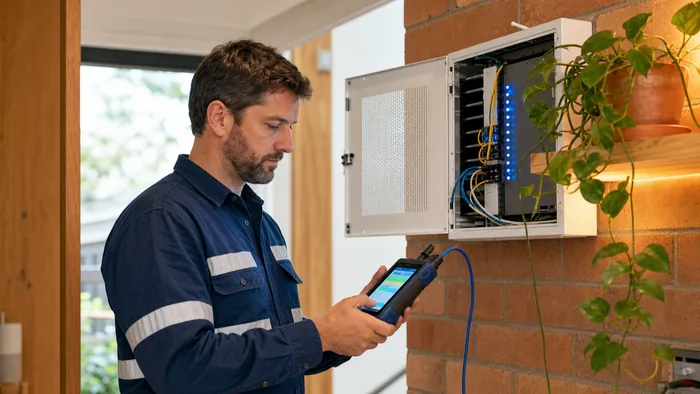
How much speed a phone call actually needs
Less than people assume. A single call uses a small fraction of a typical business connection.
The question is not whether your connection is fast enough for one call. It is whether it stays steady when your busiest moment coincides with somebody uploading a large file, a backup running, or a dozen people on video.
So the useful test is not a speed test on a quiet afternoon. It is knowing your upload speed, the number of calls you need at once, and what else the connection is doing at the same time.
Your router and network matter more than your plan
This is where most poor experiences actually come from, and it is rarely the NBN's fault.
The connection into the building is one thing. What happens after it is another. An old router, a cheap switch, a network that treats a phone call the same as a file download, cabling that was run for something else years ago: any of those will make calls sound bad on a connection that tests perfectly.
A phone system that is set up properly gives voice priority over everything else on the network, so a call does not degrade because somebody is uploading. That configuration is part of the install, not an extra.
Poor call quality has causes that go beyond the NBN itself, and business VoIP systems covers them in full.
What actually breaks when a business moves phones to the NBN
The failures are predictable and they are almost never the phones.
- Nobody checked the upload speed, so the system works with two people on calls and falls over with six.
- The old alarm, lift phone or EFTPOS line got forgotten. These often sat on the same copper service and they need their own answer.
- A fax or a back to base monitoring service was assumed to just work. They frequently do not.
- The numbers were not moved properly, which is its own subject and covered on business VoIP systems.
- The router was left as the provider shipped it, with no priority given to voice.
The pattern is that the phones get planned and the things attached to the old phone line do not. It is worth listing them before anything is ordered.
Multiple lines, and what replaces them
If you have several copper lines with a hunt group so callers roll to the next free one, there is no equivalent to buy and you do not need one.
A VoIP system does not have lines in that sense. It has a number of simultaneous calls it will carry, and that number is a setting rather than a physical thing. Going from six to ten is a change on the system, not a technician and a new cable.
That is usually cheaper than what the copper lines cost, which is the part businesses are most surprised by.
Handsets that run over the NBN
These connect over your internet service rather than a phone line. Prices exclude GST.
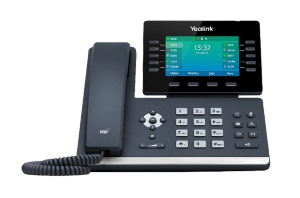
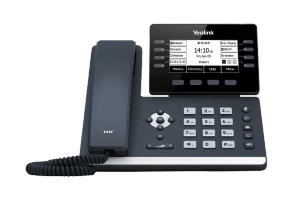
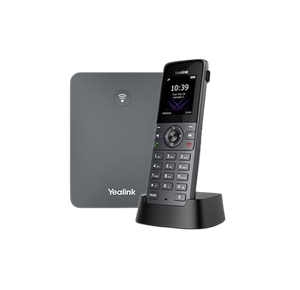
Do you need special phones?
For a new system with desk phones, yes, in the sense that the handsets are IP phones rather than the analogue ones from a copper line. They plug into your network rather than a phone socket. Softphones are phone apps on your computer or mobile.
If you are keeping your existing system with a gateway, no. Your current handsets stay exactly as they are.
If you are buying handsets, Yealink phones covers which model suits which job, and DECT and cordless covers the cordless side for anybody who is not sitting at a desk.
What to do first, in order
If you are moving phones onto the NBN, or fixing a move that did not go well, this is the sequence that avoids the expensive surprises.
- Write down everything attached to your current phone lines. Not just the handsets. The alarm, the lift phone, the EFTPOS terminal, the fax, the back to base monitoring, the door intercom. This is the step that gets skipped and it is the one that causes the emergency.
- Find your upload speed, not your download speed. Most providers show it in the account portal, and a speed test will tell you if not.
- Count the calls, not the people. Ten staff who are rarely on the phone need fewer simultaneous calls than three who are on it constantly.
- Establish what you own. Note the make, model and rough age of your existing system. A quote needs them whether you replace it or keep it on a gateway.
- List the numbers you must keep, and check where each one currently sits. Numbers advertised on vehicles, signage and directories are the ones that hurt to lose.
- Only then get quotes. A quote given without the five items above is a guess, and it is the reason the final invoice so often does not match it.
We will walk through that list with you on the phone in about ten minutes, and you are welcome to take the answers to somebody else.

What it costs
Prices for handsets are on each product page. What a system costs depends on how many people, how many simultaneous calls, and whether you are keeping what you have or replacing it.
We do not take orders through this website. Tell us what you have now and what is not working, and we will quote it, with the equipment and the work priced separately rather than rolled together.
Getting a straight answer
We have been installing business phone systems in Australia for years, through the whole NBN transition and well before it, and we are highly trained across the equipment we supply.
If your system is old, we will say plainly that we recommend replacing it with new desk phones or softphones. If you would rather keep what you have, we can still connect it with a gateway.
Two of our longer write ups go deeper: the complete guide to NBN phone systems, and VoIP and the NBN, on getting reliable performance.
Tell us what you have and what is going wrong. Call 1300 865 879, or send us the details and we will come back to you.
Common questions
- What is an NBN phone system?
- A phone system that carries calls over your internet connection instead of a copper phone line. The technology is VoIP and the NBN is the connection it runs on. There is no separate phone service on the NBN to buy.
- Can I keep my existing PABX on the NBN?
- Yes, with a gateway that sits between your existing system and the network, so your handsets, extensions, line hunt and caller ID keep working. It is not what we recommend, though. We recommend replacing an old system with new desk phones or softphones, and we install both.
- Do I need a new phone for the NBN?
- Only if you are replacing the system. New desk phones are IP handsets that plug into your network rather than a phone socket, and softphones are phone apps on your computer or mobile. If you keep your existing system with a gateway, your current handsets stay.
- How much internet speed do I need for phone calls?
- Very little per call, but it has to be steady, and upload matters as much as download. The real question is how many calls you need at once and what else is using the connection at the same time.
- Will my phones work on fibre to the node, or fixed wireless?
- Yes. Connection type affects how many simultaneous calls the service carries cleanly rather than whether it works at all. It is worth knowing your upload speed before you decide how many calls to provision.
- Why do calls sound bad even though my NBN is fast?
- Almost always the network inside the building rather than the connection into it. An old router, no priority given to voice, or ageing cabling will spoil calls on a connection that tests perfectly.
- What happens to my alarm, lift phone or EFTPOS line?
- These often shared the old copper service and they need their own answer, which is separate from the phone system. They are the single most commonly forgotten item, so list them before anything is ordered.
- Do I have to change internet providers to change my phone system?
- No. Your phone system and your internet service are separate decisions. You can change one without touching the other.